
Here are the steps to view Advance Receipt details:Viewing Advance Receipt Details
Step 1: Access Receipt List
Navigate to Credit Management → Advance → Open
You'll see a list of all active advance receipts
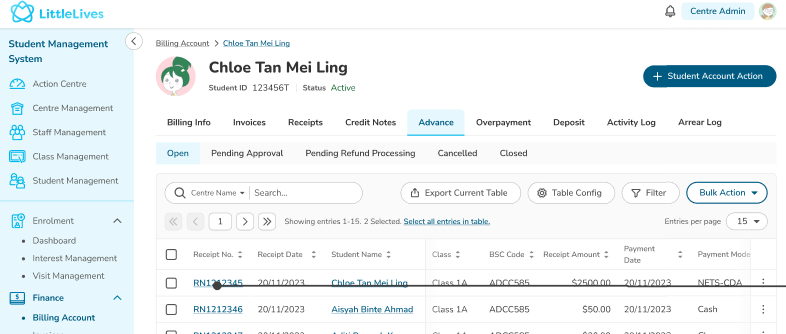
Step 2: View Specific Receipt
Click on the Receipt No to open detailed view
Review all receipt information and utilization status
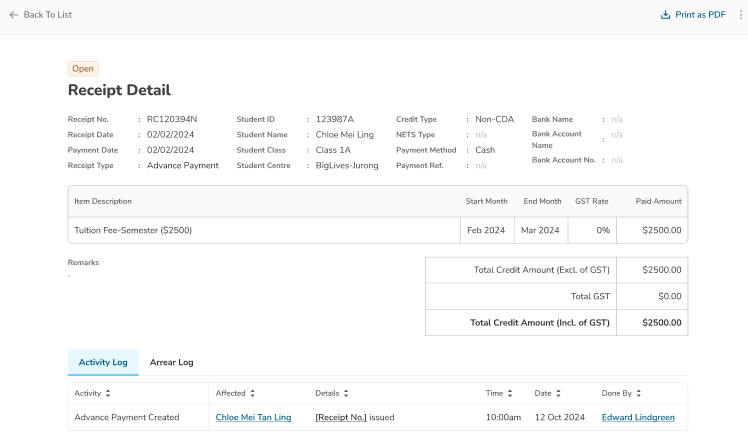
Status Tracking
- Open tab: Active advance receipts (not fully used)
- Closed tab: Fully utilized advance receipts
Watch the video below:
Was this article helpful?
That’s Great!
Thank you for your feedback
Sorry! We couldn't be helpful
Thank you for your feedback
Feedback sent
We appreciate your effort and will try to fix the article